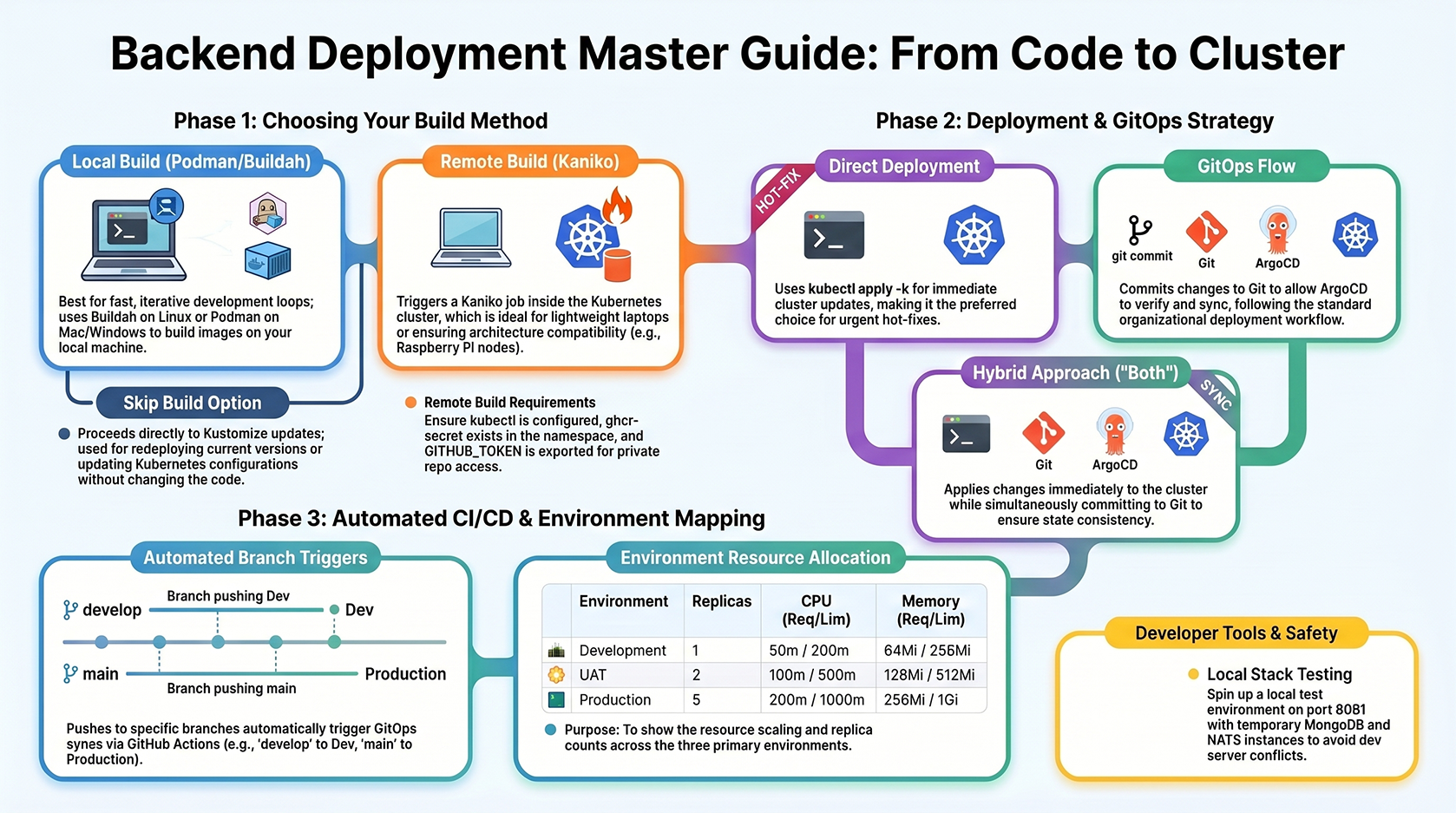
 A quick guide to common commands used for managing backend deployments across different environments using the unified
 deploy.sh script.
📦 Deployment Script
The backend service includes a flexible deployment scriptdeploy.sh that supports Podman, Buildah, and Kaniko (GitOps), removing the dependency on Docker Desktop.
Usage
Build Options
When running the script, you will be prompted to choose a build method:1. Local Build (Podman/Buildah)
- Tool: Automatically detects and uses
buildah(Linux) orpodman(Mac/Windows). - Environment: Runs on your local machine.
- Cross-Platform: Supports building for different architectures (e.g., M1 Mac -> Intel Server).
- Best for: Fast, iterative development loops.
- Requirement:
podmanorbuildahmust be installed locally.Authentication: To push images to GHCR, ensure you are logged in:
2. Remote Build (Kaniko)
- Tool: Triggers a Kaniko Job inside your Kubernetes cluster.
- Environment: Runs on the cluster nodes (e.g., Raspberry Pi).
- Best for:
- Deploying from devices without local build tools (e.g., lightweight laptops).
- Ensuring architecture compatibility (builds on the target architecture).
- Reducing local resource usage.
- Requirement:
kubectlconfigured to point to the cluster.ghcr-secretexists in the namespace (for pushing to GHCR).GITHUB_TOKENenvironment variable must be exported (for private repo cloning).
- Cross-Platform: Kaniko runs on the cluster architecture by default. To force a specific platform:
3. Skip Build
- Action: Skips the build/push step and proceeds directly to Kustomize updates.
- Best for: Redeploying the current version or updating k8s configs without code changes.
Deployment Methods
After the build phase, you can choose how to apply changes:🧪 Local Testing (Optional)
If you need to spin up the stack locally for testing:🤖 CI/CD Automation
Deployments are automated via GitHub Actions (.github/workflows/backend-k8s-deploy.yml) triggered by pushes to specific branches: