Overview

This demonstrates how REST and GraphQL coexist in the same application using Hexagonal Architecture. Both protocols share the same domain logic and services.
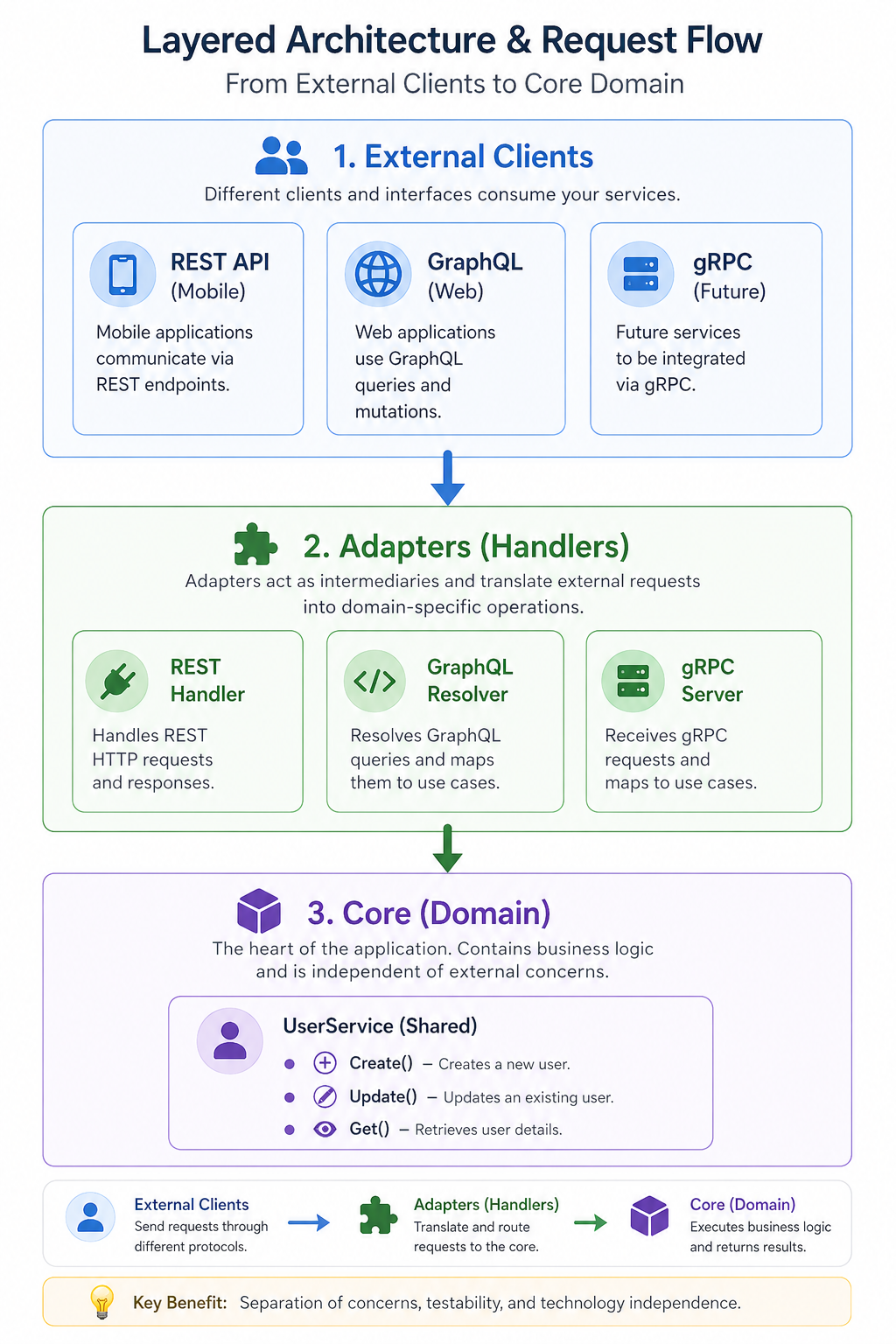
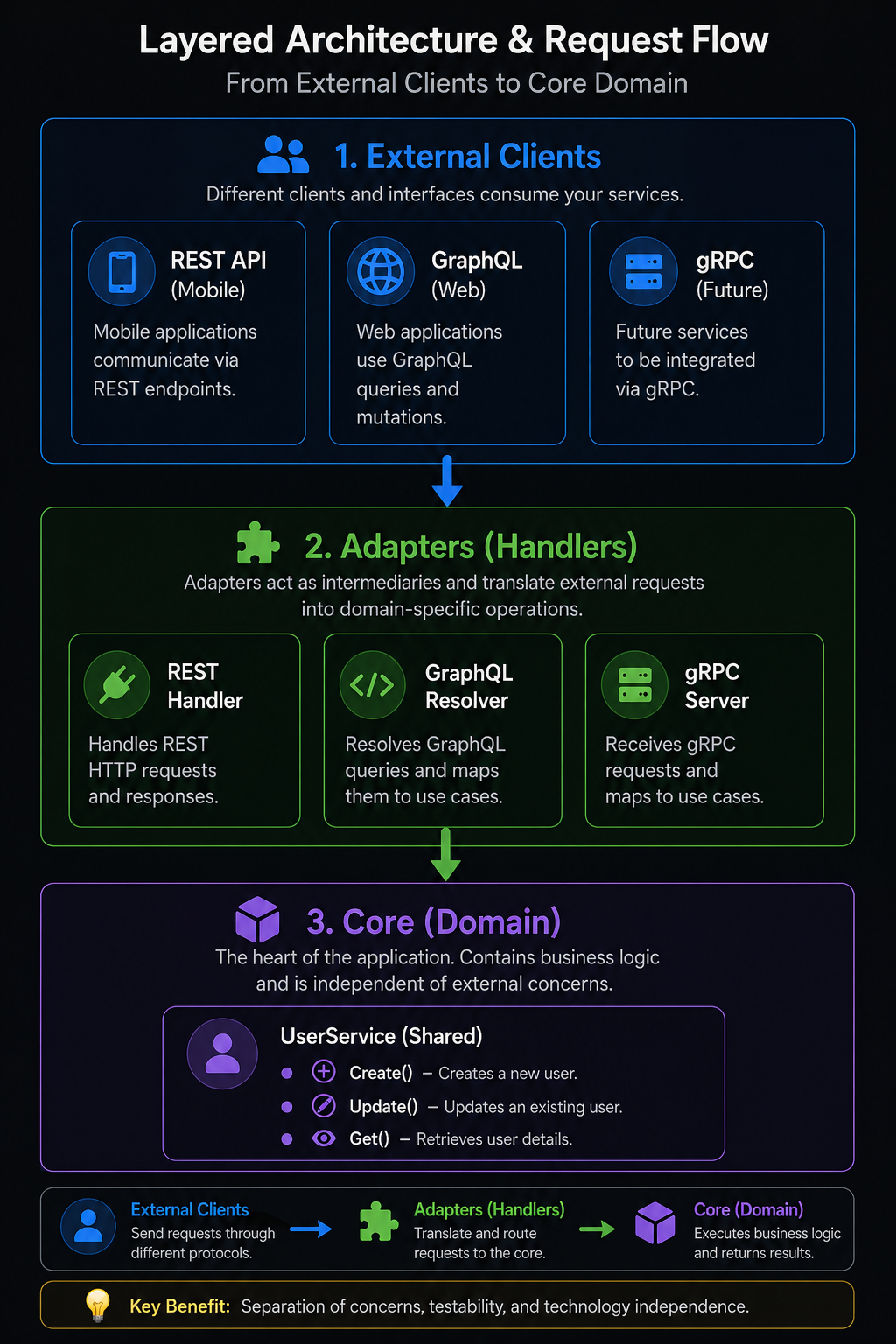
Layered Architecture & Request Flow

File Structure

internal/modules/
└── user/
    ├── domain/               # Hexagon Core: Domain models
    ├── application/          # Hexagon Core: Application logic
    │   ├── port/             # Interface definitions
    │   └── usecase/          # Service implementation (shared)
    └── adapter/              # Adapters layer
        └── inbound/
            ├── http/         # REST adapter
            │   └── handler.go
            └── graphql/      # GraphQL adapter
                ├── schema/   # GraphQL schema
                └── resolver.go

Example 1: Create User

REST (POST /api/v1/auth/register)

Request:
curl -X POST http://localhost:8080/api/v1/auth/register \
  -H "Content-Type: application/json" \
  -d '{
    "email": "john@example.com",
    "name": "John Doe",
    "password": "password123",
    "roles": ["buyer"]
  }'
Response:
{
  "id": "01ABCDE123",
  "email": "john@example.com",
  "name": "John Doe",
  "roles": ["buyer"],
  "createdAt": "2025-01-15T10:00:00Z"
}

GraphQL (POST /graphql)

Request:
mutation {
  createUser(
    input: {
      email: "john@example.com"
      name: "John Doe"
      password: "password123"
      roles: ["buyer"]
    }
  ) {
    id
    email
    name
    displayName # GraphQL-specific computed field!
    roles
    createdAt
  }
}
Response:
{
  "data": {
    "createUser": {
      "id": "01ABCDE123",
      "email": "john@example.com",
      "name": "John Doe",
      "displayName": "John Doe <john@example.com>",
      "roles": ["buyer"],
      "createdAt": "2025-01-15 10:00:00"
    }
  }
}
Notice: GraphQL has a displayName field that REST doesn’t have!

Example 2: Get User

REST (GET /api/v1/users/:id)

Request:
curl -X GET http://localhost:8080/api/v1/users/01ABCDE123 \
  -H "Authorization: Bearer <token>"
Response:
{
  "id": "01ABCDE123",
  "email": "john@example.com",
  "name": "John Doe",
  "roles": ["buyer"]
}

GraphQL (POST /graphql)

Request:
query {
  user(id: "01ABCDE123") {
    id
    email
    name
    displayName
    roles
    createdAt
  }
}
Response:
{
  "data": {
    "user": {
      "id": "01ABCDE123",
      "email": "john@example.com",
      "name": "John Doe",
      "displayName": "John Doe <john@example.com>",
      "roles": ["buyer"],
      "createdAt": "2025-01-15 10:00:00"
    }
  }
}

Example 3: List Users

REST (GET /api/v1/users?limit=10&offset=0)

Request:
curl -X GET "http://localhost:8080/api/v1/users?limit=10&offset=0" \
  -H "Authorization: Bearer <token>"
Response:
{
  "users": [
    {
      "id": "01ABCDE123",
      "email": "john@example.com",
      "name": "John Doe",
      "roles": ["buyer"]
    }
  ],
  "total": 1,
  "hasMore": false
}

GraphQL (POST /graphql)

Request:
query {
  users(limit: 10, offset: 0) {
    users {
      id
      email
      name
      displayName
    }
    total
    hasMore
  }
}
Response:
{
  "data": {
    "users": {
      "users": [
        {
          "id": "01ABCDE123",
          "email": "john@example.com",
          "name": "John Doe",
          "displayName": "John Doe <john@example.com>"
        }
      ],
      "total": 1,
      "hasMore": false
    }
  }
}

GraphQL-Specific Features

1. Flexible Field Selection

Only get what you need:
query {
  user(id: "01ABCDE123") {
    email # Only email!
  }
}
Response:
{
  "data": {
    "user": {
      "email": "john@example.com"
    }
  }
}

2. Computed Fields

GraphQL has fields that REST doesn’t:
query {
  user(id: "01ABCDE123") {
    displayName # Computed: "Name <email>"
    createdAt # Formatted timestamp
  }
}

3. Multiple Queries in One Request

query {
  user1: user(id: "01ABCDE123") {
    name
    email
  }
  user2: user(id: "02ABCDE123") {
    name
    email
  }
  allUsers: users(limit: 5) {
    total
  }
}

Code Comparison

REST Handler

// internal/modules/user/adapter/inbound/http/handler.go
func (h *UserHandler) GetUser(c echo.Context) error {
    id := c.Param("id")

    // Call service (shared!)
    user, err := h.service.Get(c.Request().Context(), id)
    if err != nil {
        return err
    }

    // Return JSON
    return c.JSON(200, user)
}

GraphQL Resolver

// internal/modules/user/adapter/inbound/graphql/resolver.go
func (r *queryResolver) User(ctx context.Context, id string) (*domain.User, error) {
    // Call service (same service!)
    user, err := r.userService.Get(ctx, id)
    if err != nil {
        return nil, err
    }

    // Return user (GraphQL handles serialization)
    return user, nil
}

// GraphQL-specific computed field
func (r *userResolver) DisplayName(ctx context.Context, obj *domain.User) (string, error) {
    return fmt.Sprintf("%s <%s>", obj.Name, obj.Email), nil
}
Notice: Both call userService.Get() - the SAME service!

Benefits of This Approach

1. Code Reuse

  • ✅ Domain logic is written ONCE
  • ✅ Both REST and GraphQL use the same services
  • ✅ No duplication

2. Flexibility

  • ✅ Different representations for different clients
  • ✅ GraphQL can have computed fields
  • ✅ REST can be simpler for mobile apps

3. Gradual Migration

  • ✅ Start with REST
  • ✅ Add GraphQL for web clients
  • ✅ Keep both running simultaneously

4. Protocol-Specific Features

  • ✅ GraphQL: Flexible queries, computed fields
  • ✅ REST: Simple, cacheable, mobile-friendly

Testing

Start the Server

go run cmd/server/main.go

Access GraphQL Playground

http://localhost:8080/playground

Try These Queries

1. Create a user:
mutation {
  createUser(
    input: {
      email: "test@example.com"
      name: "Test User"
      password: "password123"
      roles: ["buyer"]
    }
  ) {
    id
    email
    displayName
  }
}
2. Get user:
query {
  user(id: "YOUR_USER_ID") {
    id
    email
    name
    displayName
    roles
    createdAt
  }
}
3. List users:
query {
  users(limit: 10) {
    users {
      id
      email
      displayName
    }
    total
    hasMore
  }
}

Summary

Key Takeaways:
  1. Both REST and GraphQL coexist using the same domain services
  2. No code duplication - domain logic is shared
  3. Hexagonal Architecture makes this trivial
  4. GraphQL can have extra features (computed fields) without affecting REST
  5. Easy to add more protocols (gRPC, WebSocket) in the future
This is the power of Hexagonal Architecture!