Hexagonal Architecture: The Ports and Adapters Guide
1. The Problem: The “Software Lasagna” Mess
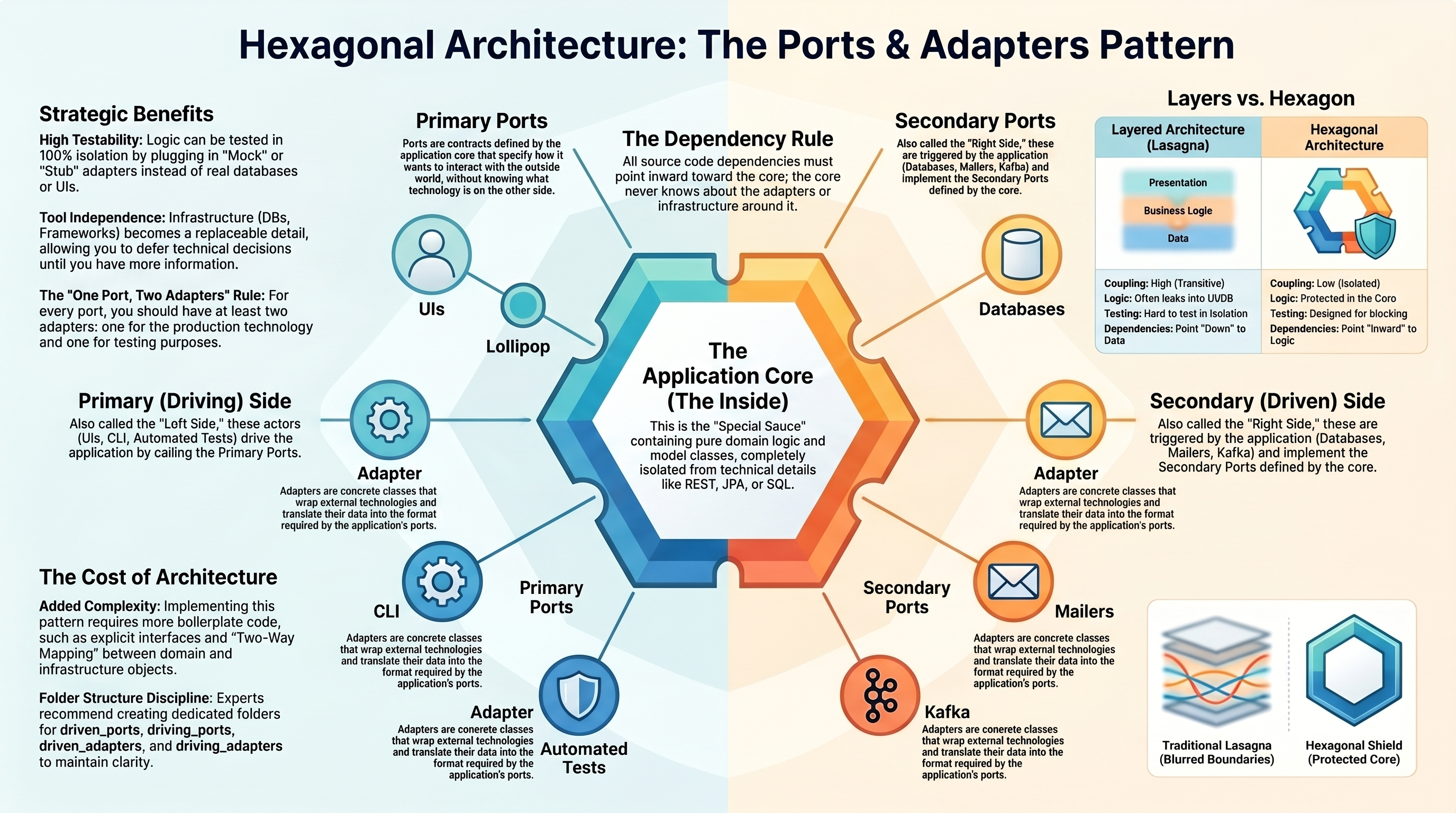
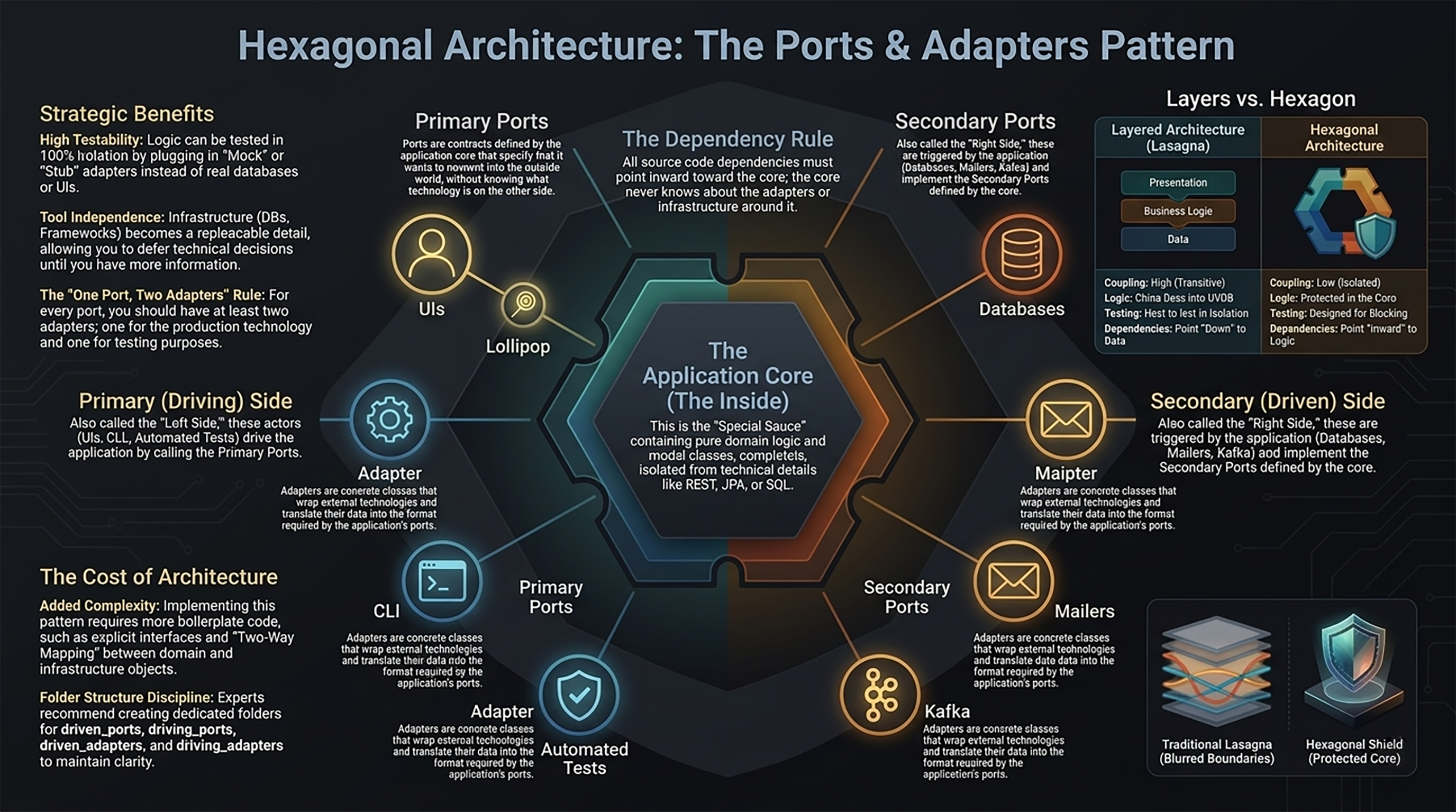
For decades, we’ve built systems using the traditional Three-Layer Architecture: Presentation on top, Logic in the middle, and Data at the bottom. While this looks organized on a diagram, it often creates what we call “Software Lasagna.” In a lasagna, the layers are compressed and inseparable. If you try to slide out the middle layer, the whole thing collapses. In technical terms, this means your Business Logic is a “slave” to your Infrastructure. Because the dependencies point downward (Logic depends on the Database), you can’t change your data storage or your UI without the “sauce” of your business rules leaking everywhere. Every time you want to upgrade a database library or change a web framework, you have to rewrite the heart of your application.The Structural Standoff: Tight vs. Loose Coupling
To fix this, we need to stop thinking about “layers” and start thinking about a Protected Core.
2. The Big Idea: “Inside” vs. “Outside”
Hexagonal Architecture—officially known as Ports and Adapters—is about drawing a hard line between your “Special Sauce” and the “Crazy World.” The Inside: This is your Application Core. It is the reason your software exists. It contains your business rules and domain logic. The Outside: This is the unpredictable world of SQL databases, REST APIs, Web Browsers, and third-party tools. The golden rule of this architecture is: The Core doesn’t know the outside world exists. It doesn’t know if it’s talking to a MySQL database or a simple text file. It doesn’t care if the trigger is a human clicking a button or an automated test script. Most importantly, The Core owns all interfaces. It defines the contracts, and the outside world must adapt to them.What Lives Where?
Inside (The Core - The Boss) Domain Rules: The logic that defines your business. Interface Definitions: The “Rules of Engagement” (Ports) that others must follow to talk to the Core. Use Cases: The specific tasks the application can perform. Outside (The Infrastructure - The Tools) Databases: SQL, NoSQL, or Cloud storage. User Interfaces: Web, Mobile, or CLI. External Services: Payment gateways, SMS providers, or Email servers.3. The Power Socket Analogy: Driving Your App
Think of your Application Core as a universal Power Socket. The socket provides electricity (your logic). It doesn’t care if you plug in a toaster, a laptop, or a lamp. In this pattern, the things that trigger your application are called Driving (Primary) Adapters. They “drive” the app to do work. The Core provides a Lollipop-shaped Port (API)—a set of functions that say, “If you want me to calculate a tax or place an order, call these methods.” The Analogy Deep DiveImagine the Core as the wall socket and the external world as the device. The Port is the physical hole in the wall (the socket). The Adapter is the specific plug on the end of your toaster’s cord. The toaster (the UI or Test) uses its adapter to convert its specific needs into the format the socket requires. Because the socket is universal, you can unplug the “UI Adapter” and plug in an “Automated Test Adapter” without ever changing the wiring inside the wall.4. The Mixing Console: Interfaces as a Contract
While the “Driving” side handles inputs, the Driven (Secondary) Ports handle outputs—where the data goes. Think of this like a Mixing Console in a music studio. The console has specific “hooks” (Ports) on the back. It defines a protocol: “If you want to receive sound from me, you must have a cable that fits this hole.” The console doesn’t care if the speaker is a Sony or a Bose. This is Dependency Inversion in action. Instead of the Core depending on a specific database, the Core defines a “Required Interface” (a Hook) and the database implements that interface.The 3 Characteristics of an “Interface as a Contract”
Technology Neutrality: The Core defines a Port called “Save User.” It refuses to mention SQL, JSON, or AWS. It only cares about the business action. Core Ownership: The Core dictates the shape of the interface. The external database must write an Adapter to translate its specific SQL language into the Core’s domain language. The “Hook” Mechanism: For Driven (Secondary) sides, the Core provides the Hook (SPI). The external world must provide the “Cable” (the Adapter) that hangs onto that hook.5. The Magic of Swapping: Testing and Future-Proofing
The true “So What?” of this architecture is that it makes your software soft. You can change your “tires” (infrastructure) without ever cracking open the “engine” (the core).The Role of “The Configurator”
You might wonder: If the Core doesn’t know the database exists, how do they ever connect? This happens in a special piece of code outside the hexagon called the Configurator (often theMain method). Like a technician behind the mixing console, the Configurator is the only part that knows which specific adapters are being plugged into which ports today. The Core remains blissfully unaware.