CI/CD Deployment Process
Overview
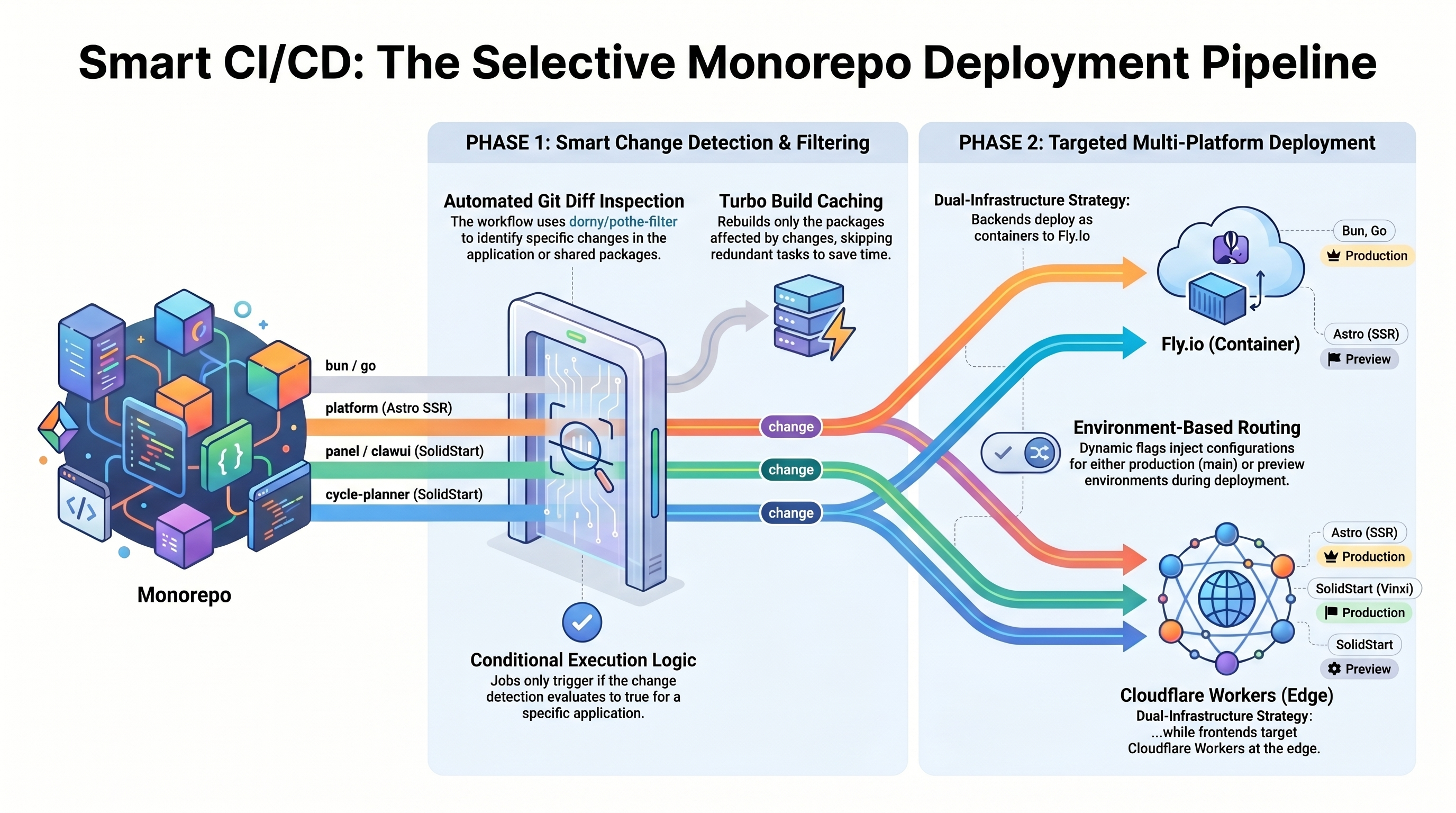
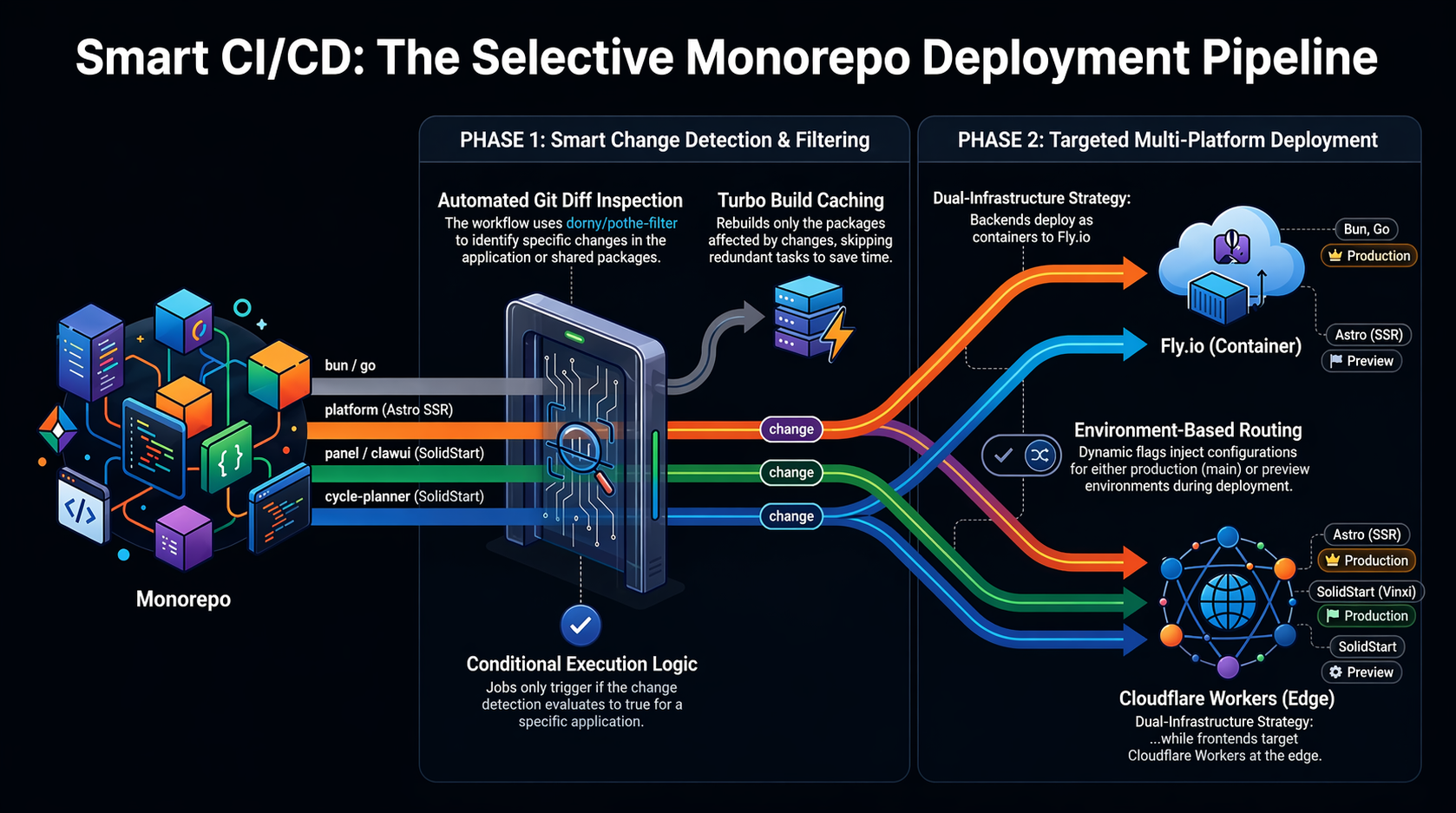
This document details the CI/CD deployment pipeline for our Turborepo monorepo. We use a Smart/Selective Build and Deployment strategy powered by GitHub Actions,dorny/paths-filter, and Turborepo. This ensures that only applications with modified code are built and deployed, significantly reducing deployment times and avoiding unnecessary updates.
The monorepo contains:
- 2 Backend Applications:
bun: Bun runtime backendgo: Go microservices backend
- 4 Frontend Applications:
platform: Astro framework with Qwikpanel: SolidStart (SolidJS)cycle-planner: SolidStart (SolidJS)clawui: SolidStart (SolidJS)
- Cloudflare Workers (via
wrangler) for serverless frontend edges and SSR handlers. - Fly.io (via
flyctl) for long-running backend services and specific frontend apps.
Selective Build Strategy
Our continuous integration avoids rebuilding the entire monorepo when a localized change occurs. By leveraging GitHub Actions alongside Turborepo’s dependency graph:- Change Detection: Using
dorny/paths-filter, the workflow inspects the git diff of the current commit to determine which applications or their local dependencies have changed. - Conditional Execution: Jobs in the deployment matrix only run if the output from the change detection step evaluates to true for that specific app.
- Turbo Build Cache:
pnpm turbo builduses caching to skip redundant tasks, rebuilding only the packages affected by the changes.
Backend Deployment Flow
Workflow File:.github/workflows/backend-flyio-deploy.yml
Our backends (bun and go) are deployed to Fly.io as containerized services.
Change Detection
The backend workflow monitors thebackend/** path. It defines filters for bun and go based on changes to their respective application code, internal packages, and dependency manifests (go.mod, go.sum).
Deployment Steps
If changes are detected in either backend:- Checkout: Retrieves the latest code.
- Setup Flyctl: Configures the Fly CLI.
- Deploy: Uses
flyctl deploywith--remote-only, utilizing thefly.tomlandDockerfilespecific to the backend (Bun or Go) to build and deploy directly on Fly’s remote builders. - Environment: Deploys using specific API tokens (
FLY_BUN_API_TOKEN,FLY_GO_API_TOKEN).
Frontend Deployment Flow
Workflow File:.github/workflows/frontend-deploy.yml
Our frontend applications use a combination of SolidStart/Vinxi and Astro, leveraging H3 HTTP utility libraries for server-side handling.
Change Detection
The workflow monitors thefrontend/** path and categorizes changes for four distinct apps: platform, panel, cycle-planner, and clawui. Changes in shared packages/ correctly trigger rebuilds for the dependent apps.
Cloudflare Workers Deployment (Astro & SolidStart)
Apps likeplatform, panel, and clawui are deployed to Cloudflare Workers using SSR (Server-Side Rendering) handlers:
- Setup: Configures
pnpmand Node 22. - Install & Build: Runs
pnpm installand the build script (pnpm buildorpnpm turbo build --filter=...).- The Astro app uses the Cloudflare adapter to output a Worker-compatible format.
- SolidStart uses Vinxi to generate optimized SSR handlers.
- Deploy: Uses
npx wrangler deploy. The target environment is dynamically determined by the branch:mainbranch deploys to the production environment (--env="").previewbranch deploys to the preview environment (--env preview).
Fly.io Deployment
In addition to the two backend applications (bun and go), the cycle-planner frontend application is also deployed to Fly.io rather than Cloudflare:
- It uses a custom
Dockerfileandfly.toml. - It only deploys when changes are detected and the branch is
main.
Environment-Based Deployment Strategy
We implement an environment-based deployment strategy targetingmain and preview branches.
Cloudflare
For applications deployed to Cloudflare Workers, we maintain separate Workers per environment. The Wrangler configuration (wrangler.toml) supports environment targets ([env.preview]). The GitHub Action dynamically injects the --env preview flag if the deployment is triggered from the preview branch.
Fly.io
For backends and Fly-deployed frontends, changes tomain and preview branches trigger updates. Fly.io apps can handle different environments through separate apps or configuration blocks in fly.toml.
Technology Stack Summary
- Package Manager:
pnpm(Monorepo workspaces) - Task Runner: Turborepo (for smart builds)
- CI/CD: GitHub Actions
- Infrastructure:
- Cloudflare Workers: Frontend Edge & SSR
- Fly.io: Backend Services & Specialized Frontends
- Frontend Frameworks:
- Astro:
platformapp - SolidStart:
panel,cycle-planner,clawui
- Astro:
- Server utilities: H3 (HTTP framework for JS), Vinxi (SolidStart bundler)
- Change Detection:
dorny/paths-filter
Related Files
.github/workflows/backend-flyio-deploy.yml.github/workflows/frontend-deploy.ymlfrontend/astro/apps/platform/wrangler.tomlfrontend/solidstart/apps/panel/wrangler.tomlbackend/go/fly.tomlbackend/bun/fly.toml