Overview
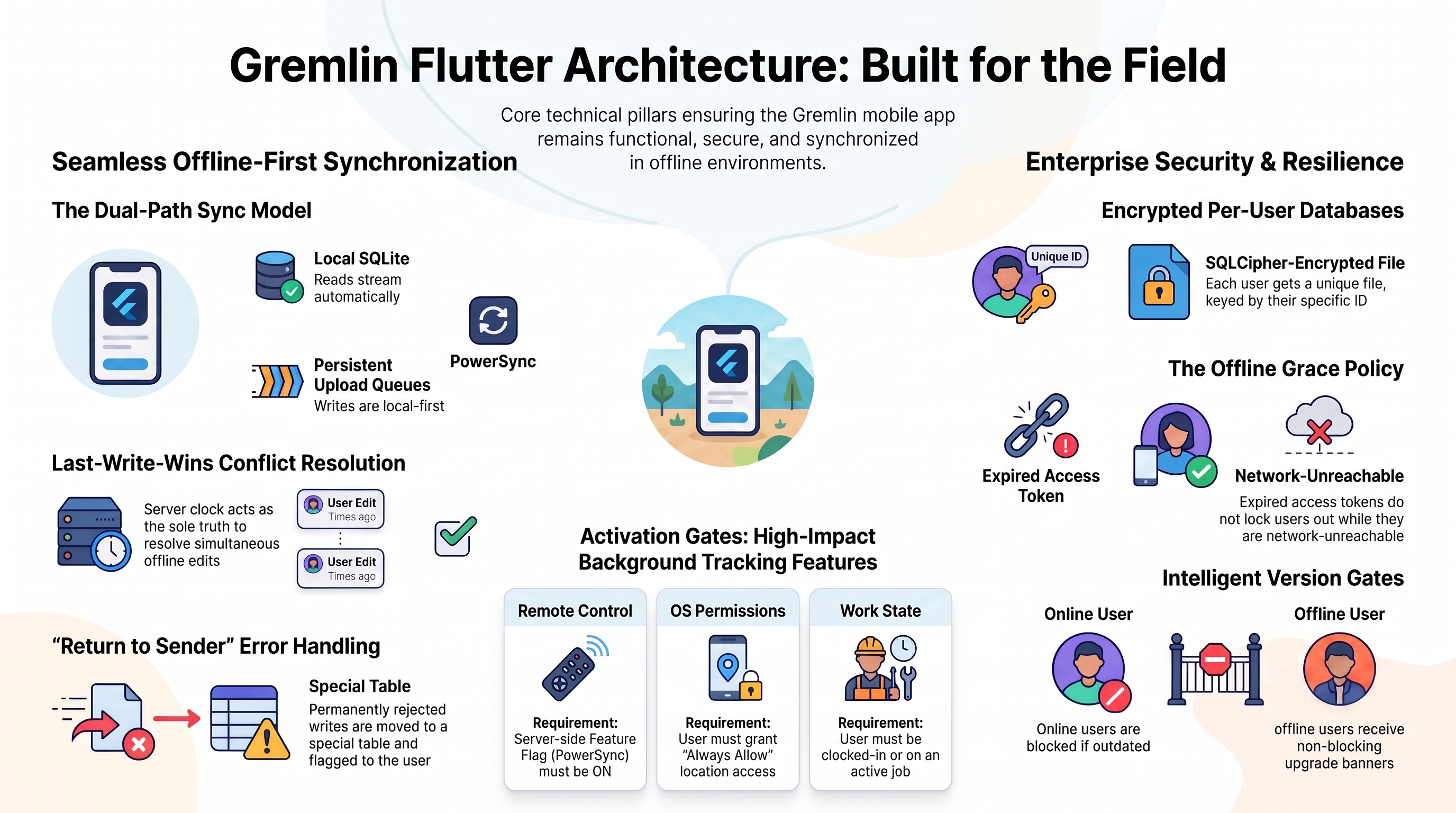
This guide explains how the core capabilities of the Gremlin Flutter apps are designed and implemented.🔄 Offline & Realtime Sync (PowerSync)
Rather than hand-rolling a custom database synchronization engine, the mobile apps use PowerSync (Open Edition) to manage offline-first capabilities. Data flows in two directions — reads and writes use different paths: Read path (server → device):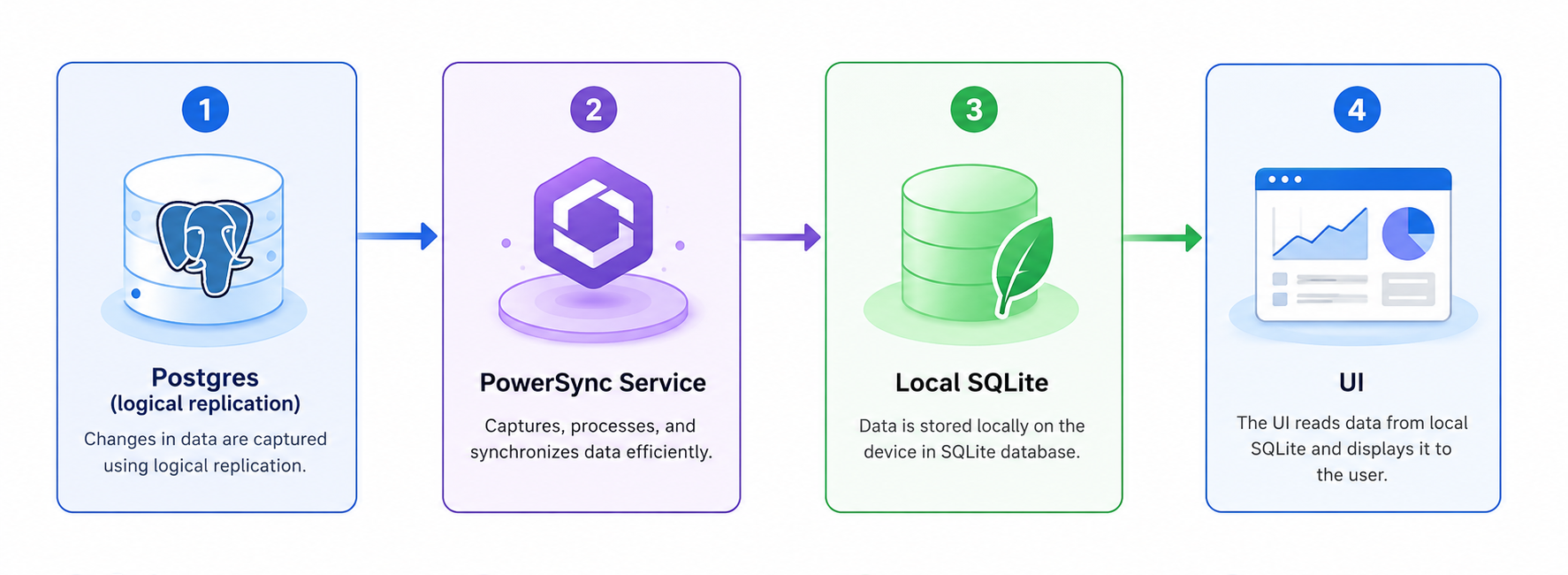
 Changes in the database propagate to every connected device automatically. The app UI uses
 Stream providers that watch the local SQLite database — no custom WebSocket code required.
Write path (device → server):
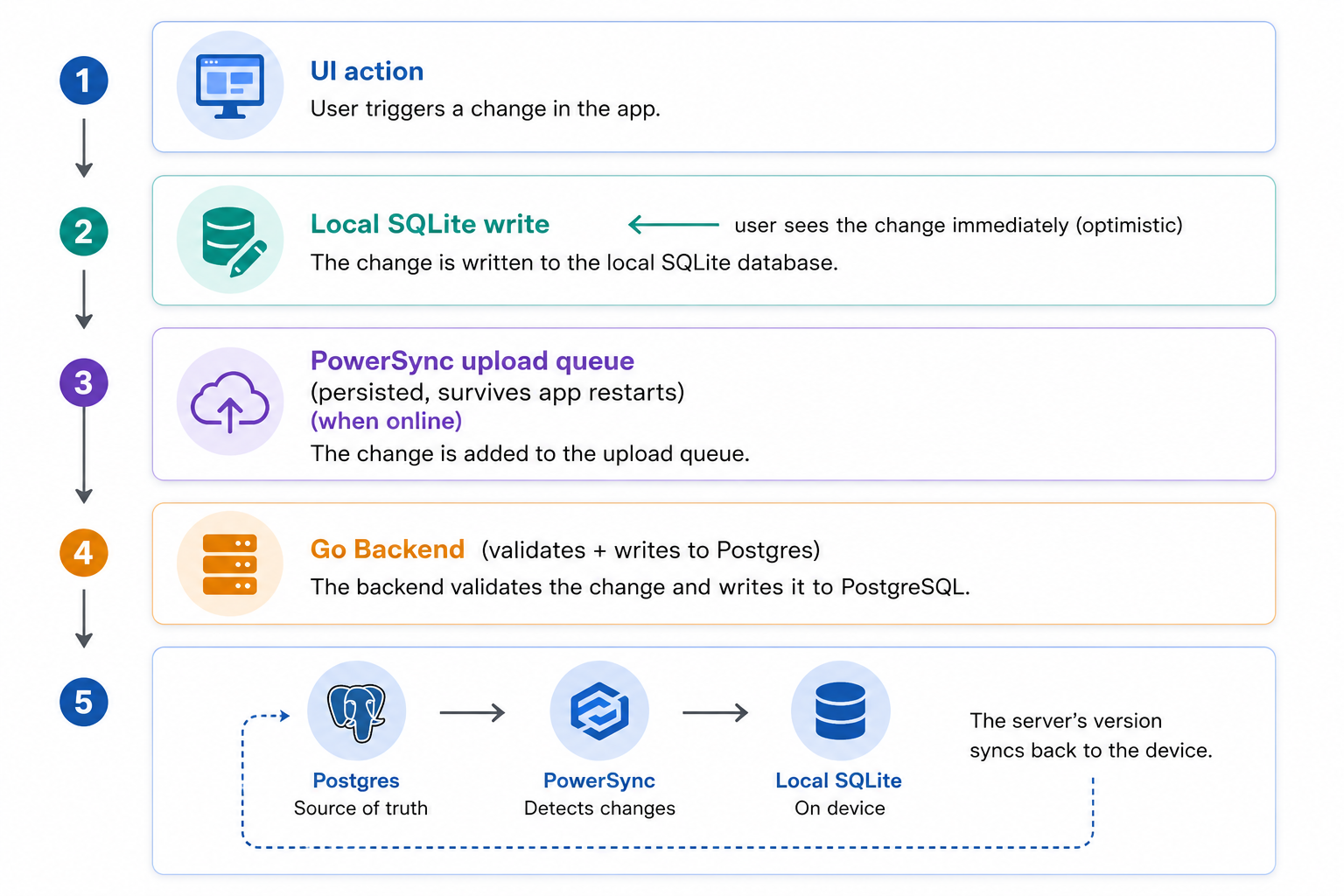
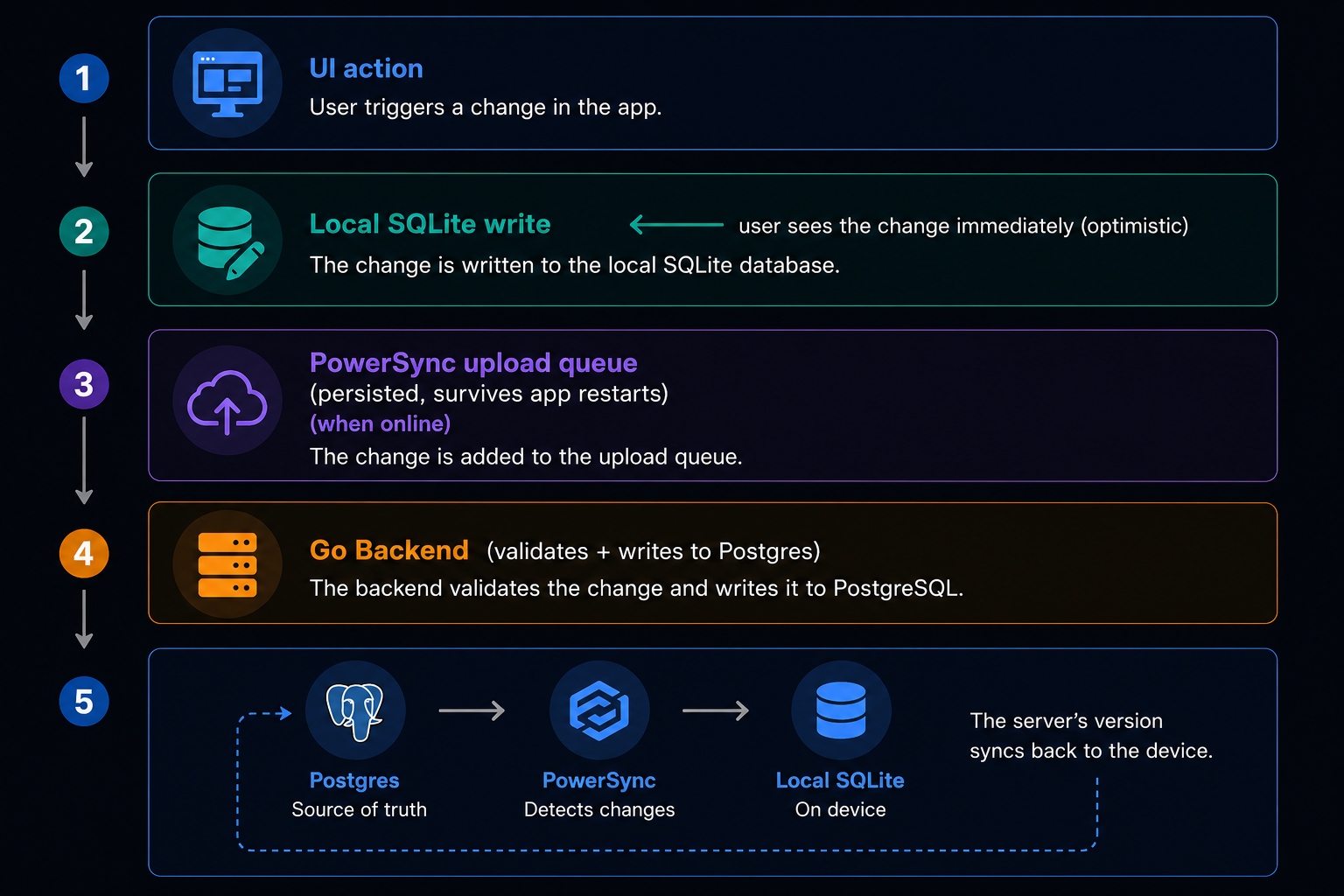 The device always writes locally first, so the UI responds instantly even with no network. The upload queue is persistent — it survives the app being killed, the phone restarting, or hours offline.
How conflicts are resolved
Two workers editing the same row while offline is a real scenario. The rule is simple: whichever write reaches the server last wins (Last-Write-Wins by server-arrival time). The server’s decision syncs back down to all devices, so everyone converges to the same value. Client device clocks are never trusted for ordering — only the server’s clock matters.What happens when the server rejects a write?
There are two kinds of failures:- Temporary failures (no network, server down, rate-limited): PowerSync automatically retries the write later. Nothing is lost.
- Permanent rejections (server says “this is invalid and retrying won’t help”): this is the tricky case. If the app just kept retrying, one bad write would block all future writes from that device forever — a stuck queue.
- The write is acknowledged — removed from the queue so it stops blocking.
- The Go backend stores the rejected write in a
rejected_mutationstable. - That table syncs back to the device via PowerSync.
- The app shows the user a notification: “One of your offline changes couldn’t be applied.”
Sync Diagnostics
A hidden diagnostics screen displaying the upload-queue depth, last-sync time, connection status, flag values, and app/config versions is built into the MVP for remote support.Key Rules
- Client UUIDv7: All primary keys are generated client-side as UUIDv7 (time-sortable UUIDs). This allows offline-created entries to have stable IDs before the server ever sees them.
- No Client Migrations: PowerSync projects the sync schema on the client as SQLite views. Schema updates are handled by changing the Sync Rules configuration on the backend and updating the schema definitions, avoiding manual SQLite migration scripts.
- No Drift Database: All persistent application state should live in PowerSync-synced tables. Do not create separate Drift or sqflite databases without approval.
🔑 Authentication & Security
The mobile apps authenticate using JSON Web Tokens (JWT) minted by the Go backend.- Token Lifespans:
- Access Token: Short-lived (30–60 minutes).
- Refresh Token: Long-lived (7–30 days).
- Token Storage: Stored securely using
flutter_secure_storage(Keychain on iOS, Keystore on Android). - JWT Verification: The PowerSync Service verifies the sync token using an HS256 shared secret (
BETTER_AUTH_SECRET, provided to PowerSync via deployment config — no JWKS endpoint). The sync token carries a distinctaud: 'powersync'claim so it cannot be replayed against the Go API, and vice versa. Thesubclaim drives client bucket parameters. JWKS/asymmetric signing is a future upgrade path once PowerSync leaves the internal trust boundary.
Device Data Lifecycle (ADR-0049)
The local database is treated as a re-syncable cache with a strict security lifecycle:- Per-User Database: The SQLite file is named and keyed by user ID (e.g.
powersync-<userId>.db). Signing in as a different user opens a different file, securing shared-device usage. - Encryption at Rest: The local database uses SQLCipher via
powersync_sqlcipher. A random encryption key is generated per device on first run and stored securely influtter_secure_storage. - Lock vs Wipe Policy:
- Passive Refresh Expiry (e.g. long offline stretch): Lock and retain. The UI locks, but the local database (including unsynced queued writes) is kept. Log in as the same user to resume.
- Explicit Refresh Rejection (user terminated/revoked on server): Lock and wipe. Instantly deletes the user’s database file, secure tokens, and cached flags.
- Explicit Logout: Prompt/warn the user if unsynced writes are pending. If confirmed, wipe database and tokens.
Refresh-on-401 Interceptor
If an API request fails with a401 Unauthorized status code, the HTTP client’s interceptor pauses the request queue, fetches a new access token using the refresh token, and replays the original request.
Offline Grace Policy
Field workers frequently lose cellular service. To keep the app functional:- Network-unreachable is not session-invalid. An expired access token does not lock the user out of the app as long as their refresh token is valid.
- The app continues to allow reading and writing cached data offline, and only hard-locks if the refresh token expires or is explicitly revoked by the server.
Verified-Identity Gate
Critical routes are guarded by a Verified-Identity gate. Users with unverified accounts are automatically redirected by a centralizedgo_router guard to an identity verification screen, preventing access to protected features.
📍 Background Location Tracking (FieldForce Only)
Because background location is battery-intensive and privacy-sensitive, it is isolated in thecore_location package. Digital Worker does not depend on this package.
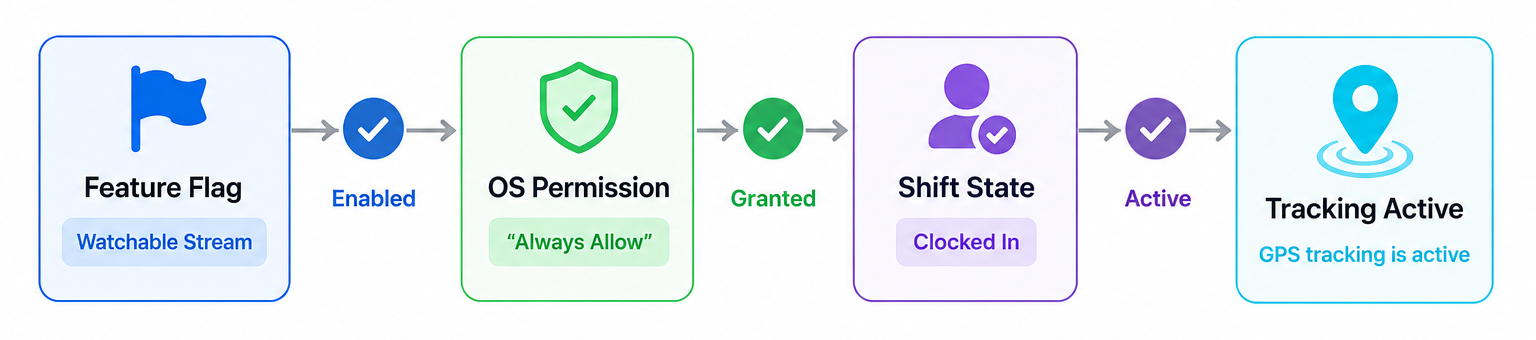
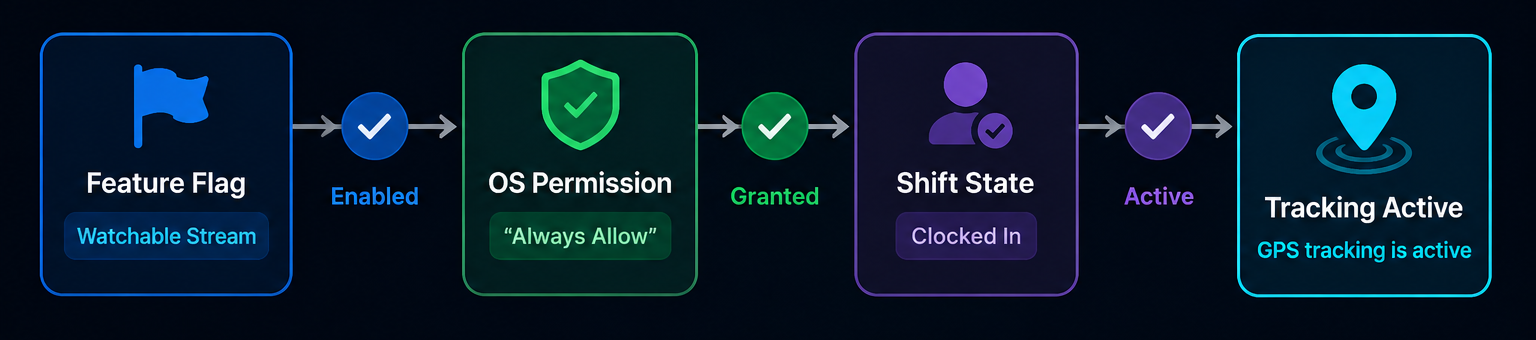
The Three-Gate Activation Rule
Tracking is active only when all three gates are open:- Feature Flag (Server-Controlled): The remote master switch.
- Delivery: Flags live in a PowerSync-synced table for automatic realtime propagation, offline caching, and last-known-value semantics.
- Injection: Injected as a watchable resolved value (
Stream<bool>/listenable) rather than a static boolean, so the location engine can cleanly tear down mid-session when killed. - Teardown: Toggling the flag off immediately stops GPS tracking, tears down the foreground service, and removes notifications (never just stops uploads).
- OS Permission: The user has granted “Always Allow” location permission.
- Shift State: The user is currently clocked-in/on an active job.
Telemetry Routing
Background location pings are high-volume. To prevent bloating PowerSync database buckets, location pings bypass PowerSync entirely. They are queued by the location engine and uploaded directly to a dedicated Go telemetry ingestion endpoint.🔔 Push Notifications
We use FCM (Firebase Cloud Messaging) for Android and APNs (Apple Push Notification service) for iOS, housed incore_notifications.
- Normal Pushes: Deliver visible notifications to the user (e.g., “New work order assigned”). Tapping the notification resolves the payload and navigates the user directly to the target screen using
go_routerdeep links (e.g.,/work-orders/{id}). - Silent Pushes: Signal the app in the background to trigger a PowerSync sync so that data is already fresh when the user opens the app.
- Important: Silent pushes are best-effort only because iOS frequently throttles background wake-ups. The app’s correctness must never depend on the arrival of a silent push.
🎨 UI & Theming
To maintain design consistency, we enforce the use of Brand Wrapper Components from thecore_ui package:
- App developers must use
BrandButton,BrandTextField,BrandSelect, etc., instead of raw Material/Cupertino widgets. - The brand wrappers handle styling (colors, spacing, typography) while delegating interactive behavior to platform-appropriate native primitives (e.g., a Cupertino date wheel on iOS and a Material picker on Android).
- All OS platform branching (
Platform.isIOS) is encapsulated inside these wrappers, keeping feature widgets clean.
🌐 Internationalization (i18n)
We use the slang library for localization.- Locales supported: EN (English), ZH (Simplified Chinese), and MS (Malay).
- Key Benefit: Slang generates type-safe, dot-notation accessors (
t.dashboard.title) that do not require aBuildContext. This allows translating error messages and labels directly inside the controllers. - Diagnostic Translation Rule:
AppFailuredefinitions incore_modelsnever importcore_i18n(preventing DAG violations).AppFailure.messageis diagnostic-only (for logs/crash reports) and never shown to users. The presentation layer maps the failure type to slang strings for UI display.
⚠️ Version Skew & Forced Upgrade (ADR-0048)
Because app store rollouts are staggered and users might delay updates, old app versions remain active in the field for weeks. We manage this compatibility skew as follows:- Headers: Every API request carries
X-App-Id,X-App-Version, andX-Platformheaders so the backend can measure adoption and reject unsupported clients. - Configuration: An unauthenticated
GET /api/mobile/configendpoint returns themin_supported_versionand app store URLs. This is fetched at startup and foreground resume, and cached locally. - Forced Upgrade (Online): If a device is online and the app version is below the minimum supported version, it blocks access with an upgrade screen. The Go API backstops this by rejecting requests with HTTP 426 Upgrade Required, which is caught and mapped to the same screen.
- Fail-Open Offline: The version gate never blocks the user offline. Stale cached data remains usable; if the cached config says the version is obsolete, a persistent non-blocking “update required” banner is shown. This prevents locking workers out when they cannot update anyway.
- API Compatibility Procedure: Breaking API changes follow an additive lifecycle: additive backend change → raise minimum version → wait for adoption (measured via headers) → remove obsolete support.
🚩 Feature Flags
To control application features dynamically from the server, we use a unified feature flagging system:- PowerSync Delivery (PowerSync): Most feature flags live in a PowerSync-synced database table. This gives us automatic offline caching, last-known-value fallback, and realtime updates without custom WebSocket code.
- Watchable Stream API: Packages receive feature flags as watchable streams (e.g.,
Stream<bool>) rather than one-time values. This ensures that when a flag is toggled on the server, the app can respond immediately mid-session (for example, stopping background tracking instantly when the location flag is turned off). - Pre-auth Config Exception: Because PowerSync is authenticated, configuration parameters that must load before login (such as the minimum supported app version) are served through the unauthenticated
/api/mobile/configREST endpoint instead.
🪲 Observability (Crash Reporting & Logging)
The app reports crashes and errors through aCrashReporter interface defined in apps/fieldforce/lib/observability/observability.dart. Firebase Crashlytics is the real backend, but it sits behind the interface so the app runs identically in development and tests without any Firebase dependency.
Uncaught error hooks
Two hooks inbootstrap.dart forward all unhandled errors to the reporter before the app crashes:
Crash context keys (CrashKeys)
Every crash report includes structured context so you can reproduce the failure without asking the user. The CrashKeys class sets these fields as Crashlytics custom keys:
No PII ever. Raw user IDs, emails, and names are never set as crash keys. The hashUserIdentifier() helper hashes the ID to a 16-character string before passing it to the reporter.
Diagnostic logs in the data layer
AppFailure.message carries a diagnostic string (e.g. "Network error: timeout after 30s") intended for crash reports and developer logs — never for display to users. The data layer logs this message to the reporter when catching exceptions:
Event / analytics logging
A typed analytics event interface is not built yet — intentionally deferred until analytics work begins (CLAUDE.md §20). Do not add Firebase Analytics or any analytics SDK speculatively.⏰ Time & Server Authority
Device clocks are unreliable due to user timezone settings, manual overrides, or hardware drift. We enforce these rules for time management:- UTC Storage: All timestamps are created, sent, and saved in UTC. The presentation layer is the only place allowed to convert UTC to local time for user display.
- Server Time Authority: The server’s clock is the absolute source of truth. PowerSync conflict resolution and queue operations rely on server-arrival timestamps, never client device clocks, to determine the final state.