Overview
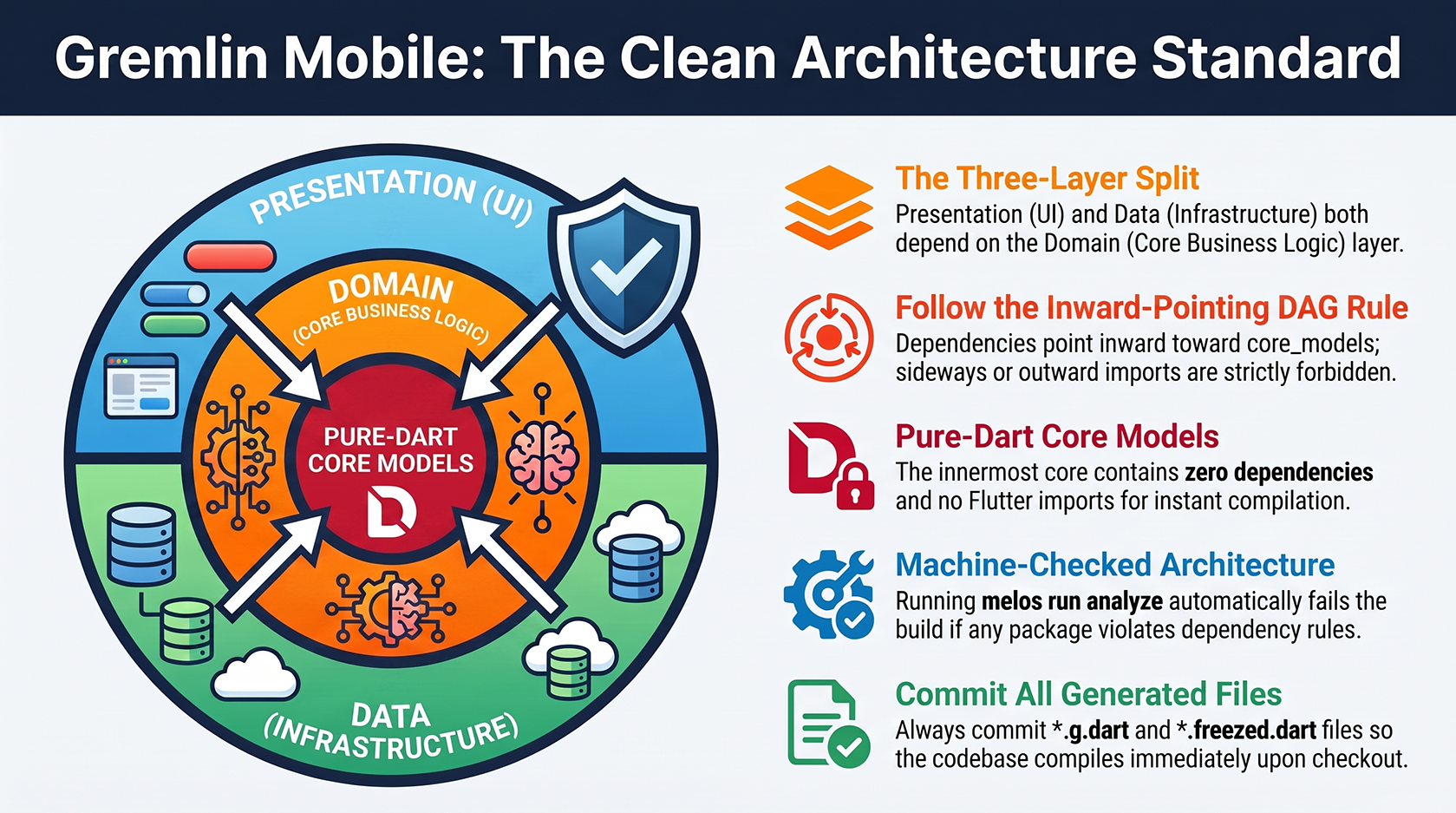
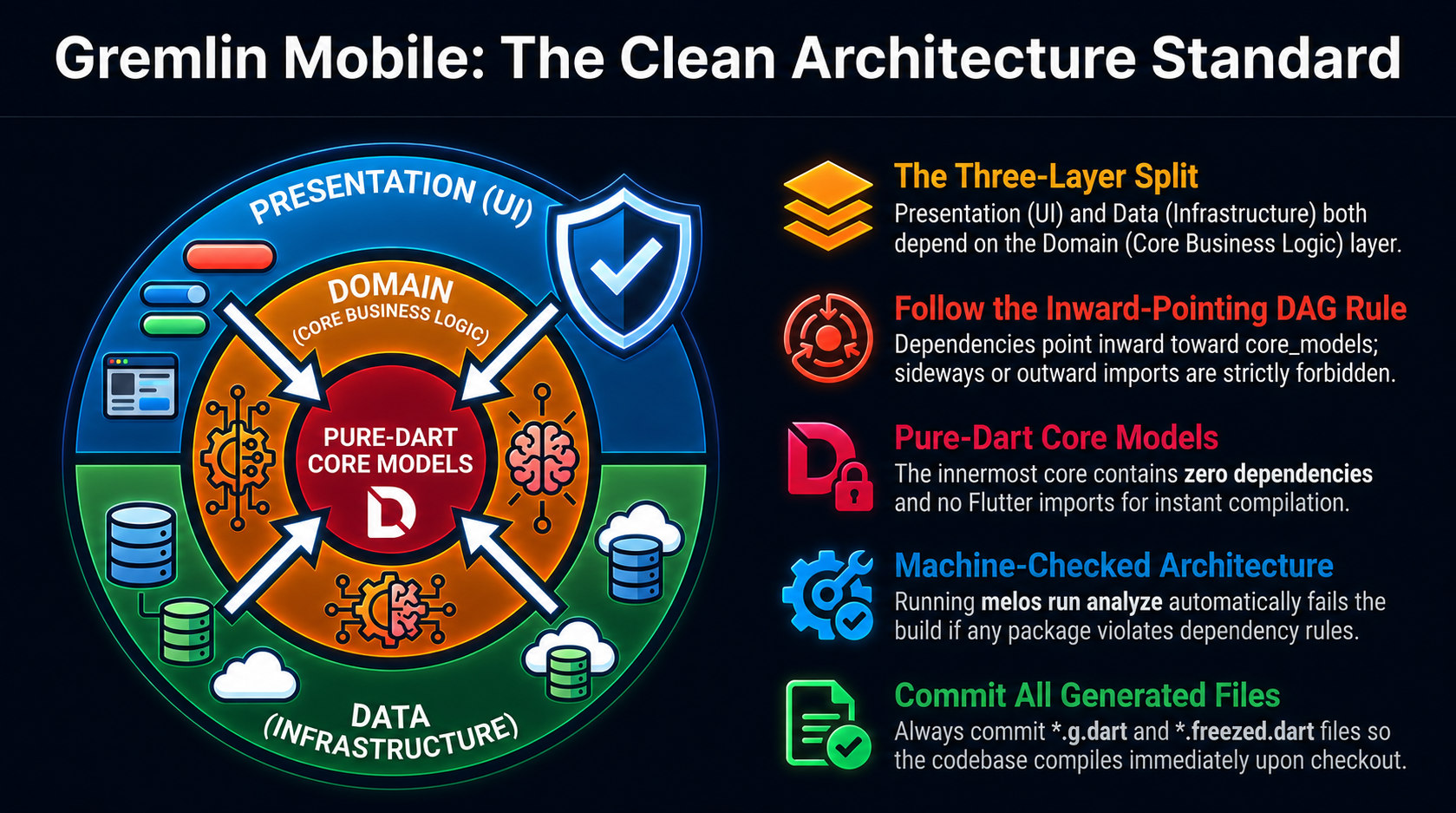
The Gremlin Mobile workspace is designed with a strict Clean Architecture layout. This layout separates our business logic from data sources and user interfaces, ensuring that the codebase is easy to test, modular, and resilient to change.🏛 Clean Architecture Layers
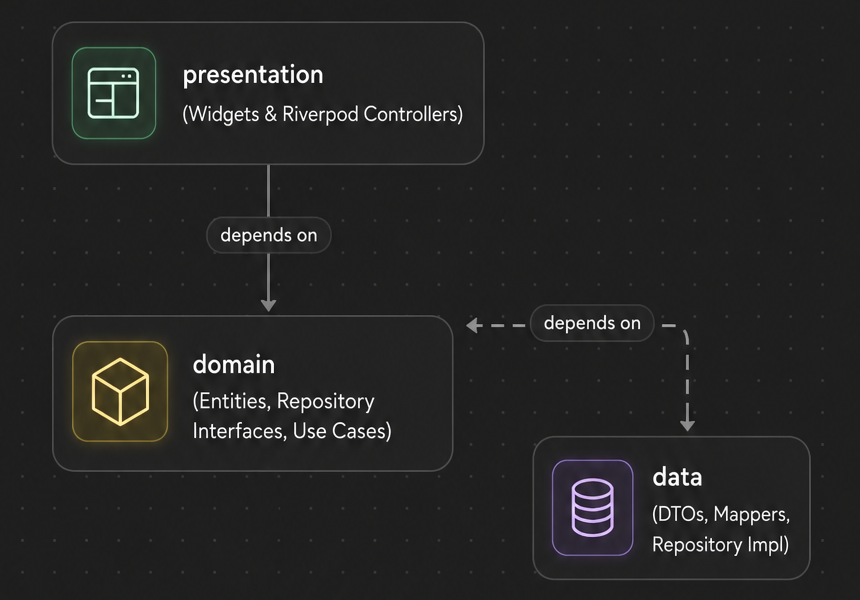
Inside every application feature or shared package, code is split into three distinct layers: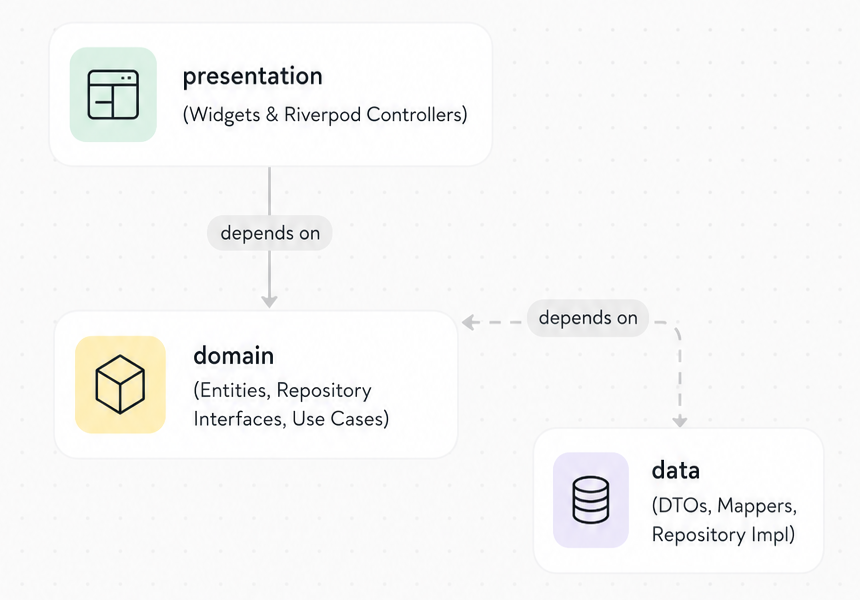
1. Domain Layer (The Core)
- What it contains: Business models (entities), abstract repository interfaces (ports), and use cases.
- Rules:
- It must be pure Dart. No imports of
package:flutter, network clients, or databases. - It depends only on
core_models. - Pragmatic Use Case Rule: For simple CRUD operations (e.g., loading a list of simple items with no business logic), the presentation controller can call the repository interface directly. We only create explicit use-case classes for complex business logic.
- It must be pure Dart. No imports of
2. Data Layer (The Infrastructure)
- What it contains: Data Transfer Objects (DTOs), API datasources (GraphQL/REST clients), local databases (PowerSync/SQLite), and repository implementations (adapters).
- Rules:
- It implements the abstract repository interfaces defined in the domain layer.
- This is the only layer allowed to use
try/catch. It catches low-level exceptions (socket timeouts, HTTP errors, database locks) and translates them into clean, typedAppFailuremodels.
3. Presentation Layer (The UI)
- What it contains: Flutter widgets, UI pages, and Riverpod controllers (notifiers).
- Rules:
- It coordinates UI state and reacts to user input.
- It depends on the domain layer (repository interfaces and use cases) to retrieve or mutate data.
- It must never import the data layer directly. This ensures the UI is entirely decoupled from how data is loaded or synchronized.
Real example: the Tasks feature
The existingtasks feature inside the FieldForce app shows exactly how this maps to files:
📐 Package Dependency DAG (Inward-Pointing Rule)
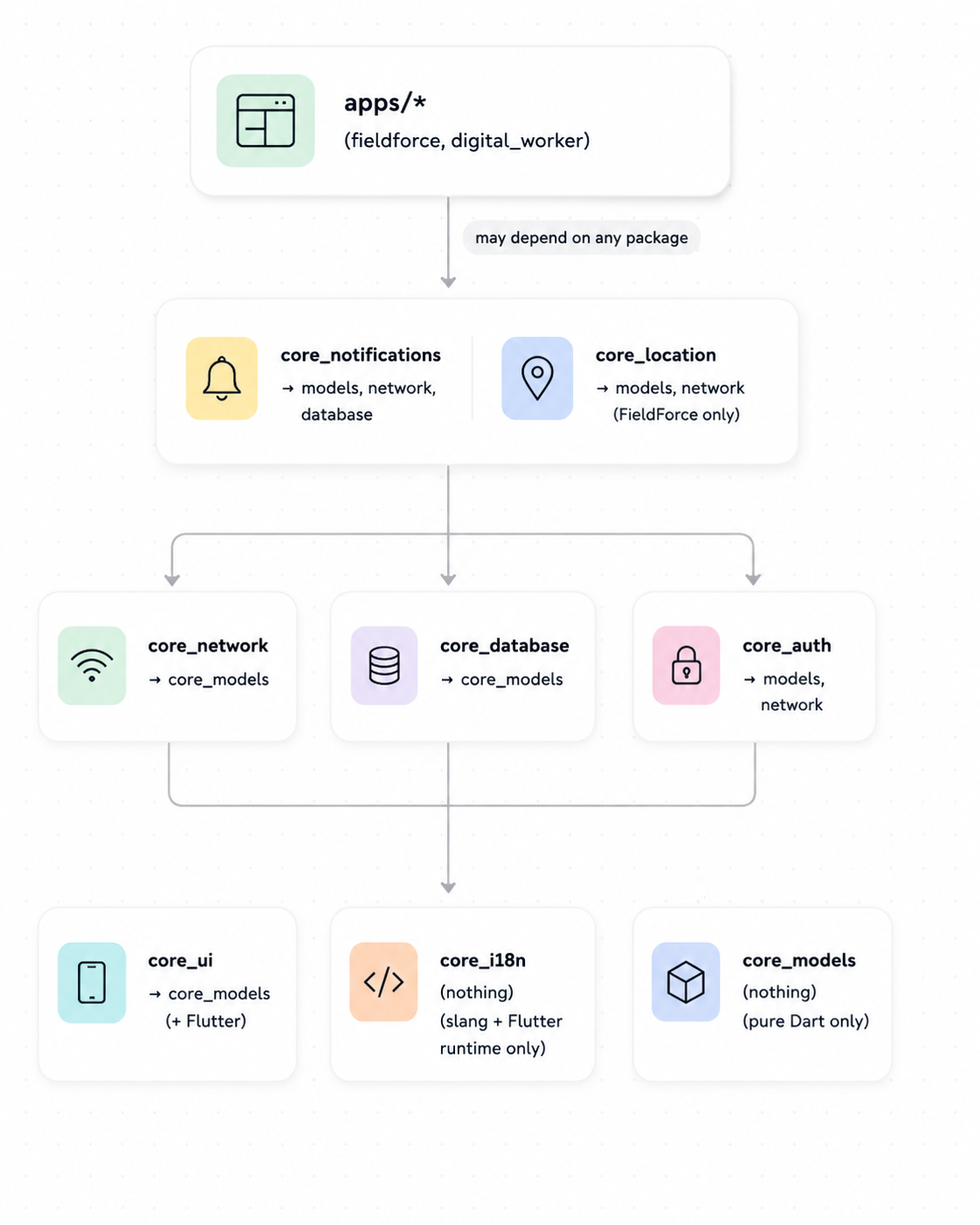
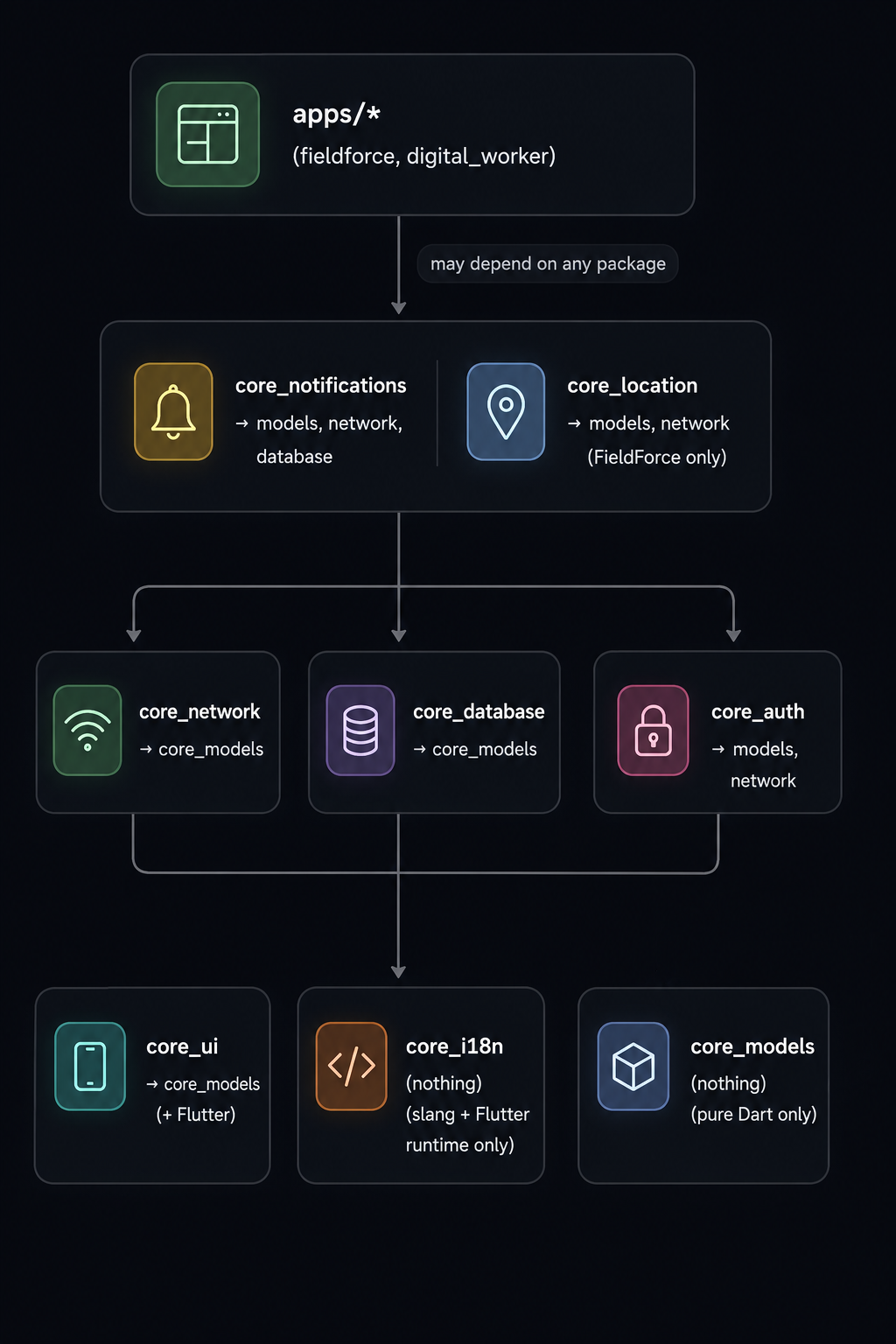
Modularity is enforced at the package level. Dependencies point inward towardcore_models, which has zero dependencies and is written in pure Dart.
The Innermost Core: core_models
- Written in pure Dart with no Flutter dependencies.
- Contains shared entities, error definitions (
AppFailure), and operation outcomes (Result). - Because it depends on nothing, it compiles instantly and is safe to use in any shared context.
Machine-Checked DAG
The dependency graph is machine-checked to prevent architectural erosion. Runningmelos run analyze executes tool/check_dag.dart, which automatically fails the build/check if any workspace package depends on a package violating the DAG rules, or if Flutter packages are imported in pure-Dart packages (like core_models). New packages must be registered in the DAG script and documented.
Sideways & Outward Imports are Forbidden
- A package must never import code from an
apps/*folder. - Modulating code into packages enforces these rules automatically at compile-time: the build tool will reject circular dependencies or incorrect imports.
What the DAG rule looks like in practice
Allowed —core_database importing core_models:
core_models importing anything:
melos run analyze will fail immediately with a message naming the bad edge. Fix it before committing.
⚙️ Code Generation Discipline
We use code generation (build_runner) to automate repetitive boilerplate for state management, JSON parsing, and immutability.
- Tools: Freezed (unions/models),
json_serializable(JSON DTOs),riverpod_generator(type-safe DI), andslang(i18n translations). - Freezed Exception: Use Freezed only for standard domain models and DTOs. The
ResultandAppFailuresealed classes must remain hand-written sealed classes; do not convert them to Freezed as its generated machinery is not needed there. - Command: Run
melos run generatefrom the workspace root to regenerate all generated files across packages. - Repository Practice: Always commit generated files (
*.g.dart,*.freezed.dart, etc.) to the Git repository. This ensures that the codebase compiles immediately upon checking it out without requiring a setup build step.
⚙️ Configuration & Secrets
We keep configuration clean and secure by separating environment values from secrets:- Environment Configurations: Non-secret configurations (like the Go API URL or PowerSync endpoint) are declared in JSON files under
apps/<app>/config/(e.g.,dev.json,prod.json). These are loaded using the--dart-define-from-filecompile flag. - Composition Root Injection: Flutter applications read these configuration values at their entry points (e.g.,
main_dev.dart) and inject them down into packages via constructors or Riverpod providers. A shared package must never callString.fromEnvironmentdirectly. It must receive its config dynamically. - Secrets Management: True secrets (like signing certificates or API private keys) are never stored in the repository. They are stored securely in Codemagic environment variables and injected during the build/compile stage in the CI pipeline.