OrgAccessRoute Guard
Overview
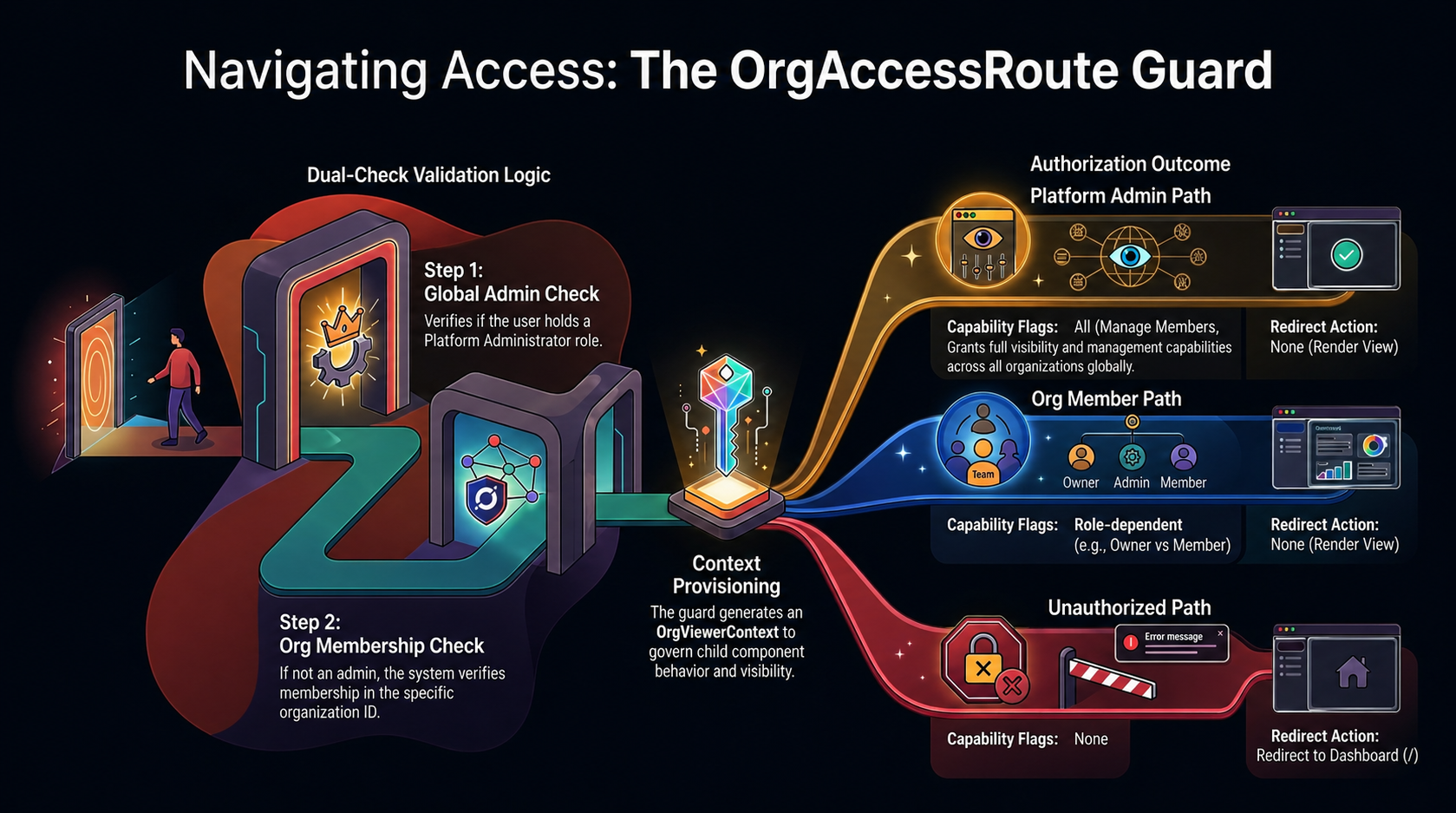
TheOrgAccessRoute is a SolidStart component that acts as a specialized route guard and context provider for organization-specific pages. It is responsible for determining if a user has permission to view a specific organization and calculating their effective permissions (OrgViewerContext) before rendering the child routes.
Problem Statement
In a multi-tenant application with a unified admin dashboard, a single URL structure (e.g.,/admin/organizations/:id) needs to serve two distinct types of users:
- Platform Administrators: Super users who need full visibility and management capabilities across all organizations, regardless of whether they are an explicit member.
- Organization Members: Regular users who only have access to organizations they explicitly belong to, with varying levels of permissions (Owner, Admin, Member) within those specific organizations.
Solution
TheOrgAccessRoute solves this by intercepting requests to organization detail routes and performing a dual-check:
- Global Role Check: First, it checks if the user is a Platform Admin using the
checkAdminAccess()utility. If they are, it grants full permissions. - Membership Check: If the user is not a Platform Admin, it calls the
getMyOrgs()API endpoint to fetch the user’s organization memberships. It then verifies if the user is a member of the requested organization ID.
The Three Outcomes
- Platform Admin Path: The user is a Platform Admin. They are granted a context with
isPlatformAdmin: trueand all capability flags (canManageMembers,canManageSettings,canDelete) set totrue. - Org Member Path: The user is an Organization Member and the requested organization is in their membership list. They are granted a context with
isPlatformAdmin: false, and capability flags are calculated based on their specific role (e.g.,owner,admin,member) within that organization. - Unauthorized Path: The user is neither a Platform Admin nor a member of the requested organization. An error toast is displayed, and they are redirected back to the dashboard (
/).
How to Use It
Wrap any route that requires organization-specific access control with theOrgAccessRoute component. It expects a render prop that receives the calculated orgViewerContext:
Context Consumption
Child components (like tabs or action buttons) consume theorgViewerContext to conditionally render UI elements:
Related Files
apps/panel/src/routes/admin/OrgAccessRoute.tsxapps/panel/src/routes/admin/organizations/[id].tsxpackages/core/src/api/rest/organizations.ts